⚡ Save Hours Every Week — Cancel Anytime

Post Every Amazon Influencer Video Everywhere — Automatically

Stop uploading by hand. Cha-Ching Automate takes the videos you've already made for Amazon and posts them to YouTube, up to 18 international Amazon storefronts, TikTok, Instagram, Facebook, Pinterest, Threads, and Walmart — with your affiliate links, thumbnails, captions in each country's language, and your schedule — so the same recording earns commissions everywhere instead of in one place.

Start Automating Today
Join Amazon Influencers saving hours every week — and earning on YouTube, Amazon storefronts around the world, social media, and Walmart at once.
  • Posts to YouTube, up to 18 Amazon storefronts, 5 social sites & Walmart
  • Works on Windows, Mac, ChromeOS, and Linux
  • All future updates free
  • Email & Facebook Group support

🔒 Stripe · Cancel anytime · No hidden fees


Amazon Global Storefront

Do I Still Need This With Global Storefront?

Global Storefront shares your videos across the Amazon storefronts you merge. That's all it does. Everywhere else your video could be earning, it stays unposted until you post it.

Global Storefront
Cha-Ching Automate
Your merged Amazon storefronts
✓ Amazon handles it
Leaves them alone, so nothing posts twice
Amazon storefronts outside your merge
—
✓ Captioned in the local language
YouTube videos and Shorts
—
✓ With your affiliate links
TikTok, Instagram, Facebook, Pinterest, Threads
—
✓ Posted automatically
Walmart Creator
—
✓ Shoppable posts
Creator Connections
—
✓ Finds and accepts campaigns

Photos can be cross posted too, not just videos. Already merged? Tell the app once, and it switches off the merged storefronts for you.


Where Your Videos Go

One Video. Every Platform.

Turn on the destinations you want in Connected Accounts — each one gets its own settings and rules. Photos can be cross posted too, not just videos.

▶️

YouTube

Videos and Shorts on one channel or several, plus YouTube Posts for photos and Walmart shares.

🌍

Amazon Storefronts

Canada, the UK, Australia, Singapore, India, Germany, France, Italy, Japan, Spain, Poland, Belgium, and the Netherlands — plus Sweden, the UAE, Saudi Arabia, Brazil, and Mexico once you turn them on in Settings → Advanced.

🎵

TikTok

Posted right away, scheduled, or saved as a draft — with your thumbnail as the cover.

📸

Instagram

Reels posted right away or scheduled — with your thumbnail as the cover.

👍

Facebook

Posted to your Facebook Page right away, scheduled, or saved as a draft.

📌

Pinterest

Video Pins on the board you choose — with alt text, and optionally tagged with the product.

🧵

Threads

Posted right away, scheduled, or saved as a draft — videos over 5 minutes trimmed or skipped, your choice.

🛒

Walmart NEW

Shoppable Walmart Creator posts tagged with the Walmart product that matches your Amazon product.


How It Works

Set It Once. Earn Forever.

Cha-Ching Automate does the heavy lifting so you can focus on creating content — not transferring video files.

1

Connect Your Accounts

Link your Amazon Creator Hub and YouTube channel through our simple setup wizard — about 5 minutes. Then sign in to any storefronts, social sites, and Walmart you want to post to.

2

Configure Your Preferences

Choose which videos go where — by date, page range, rules, or by hand — and set your titles, descriptions, playlists, affiliate links, and whether each destination gets videos, photos, or both.

3

Run the Automation

Hit 'Run Now' or let it run on a schedule. Your videos upload with titles, thumbnails, descriptions, and affiliate links — then cross-post to your storefronts, social sites, and Walmart.

4

Watch the Commissions Roll In

The Run Summary shows everything that was posted, with links. More platforms means more clicks, more traffic, and more affiliate commissions — on autopilot.


Screenshots

See It In Action

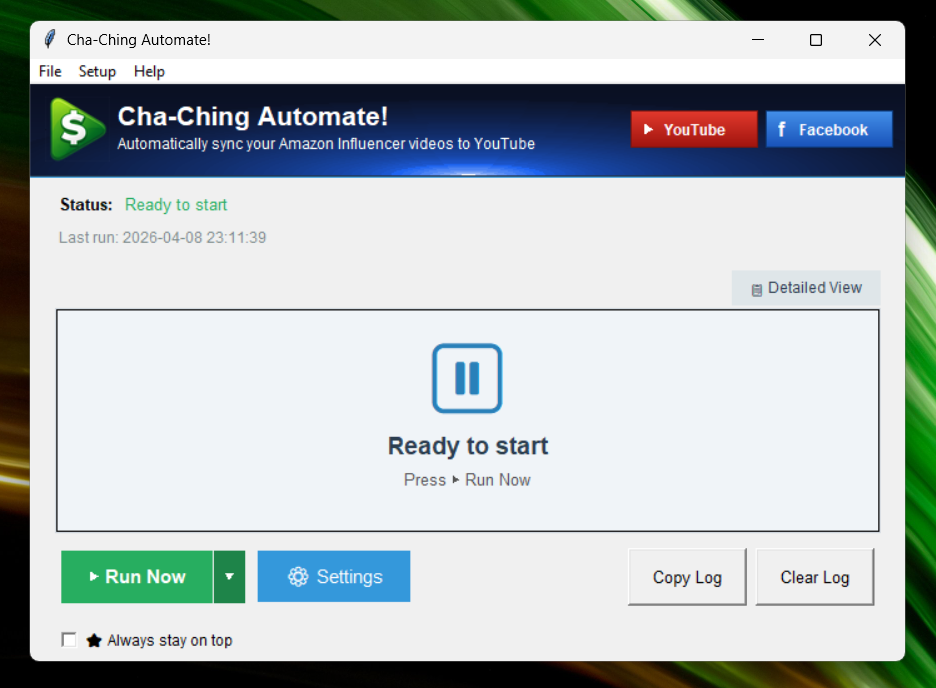
A look at the Cha-Ching Automate desktop app.
✕ ‹
Screenshot
›

Features

Everything You Need to Scale

Built by an Amazon Influencer, for Amazon Influencers.

📣 Post Everywhere

⚡

1-Click Sync

Send dozens of Amazon videos to YouTube and every other destination in one click. No manual downloading, renaming, or copy-pasting.

🌍

Up to 18 Storefronts, 1 Click

Cross-posts every video to international Amazon storefronts — Canada, the UK, Australia, Singapore, India, Germany, France, Italy, Japan, Spain, Poland, Belgium, and the Netherlands — each tagged with that country's own product, so a single recording earns commissions around the world. Sweden, the UAE, Saudi Arabia, Brazil, and Mexico can be added too: turn them on in Settings → Advanced. New storefronts ship in updates at no extra cost.

📱

Social Media Cross-Posting

Posts each video to TikTok, Instagram, Facebook, Pinterest, and Threads with your link and post text — right away, scheduled for later, or saved as a draft to tweak first (drafts work everywhere except Instagram). Choose a deep, standard, or plain Amazon link for each site, and one-word-at-a-time captions if you like.

🛒

Walmart Creator NEW

Turns each video into a shoppable Walmart Creator post tagged with the Walmart product whose picture matches your Amazon product. No match? You get a "Find it on Walmart" link to pick it yourself. Optionally share each new Walmart post to YouTube Posts or your Facebook Page.

📷

Photo Posts NEW

Post photos too — to YouTube Posts, every social site, Walmart, and your Amazon storefronts. Choose videos, photos, or both for each destination, and even post each video's thumbnail as its own photo.

💰 Earn More

🤝

Creator Connections on Autopilot NEW

Finds Creator Connections campaigns for the products in your videos — new and old — accepts the best one, submits your video links, and can message each brand with your links using a template you write. It never sends the same link twice.

🔗

Auto Affiliate Links

Your Amazon affiliate tag, a SiteStripe short link, or a deep link (PostTap, GeniusLink, or URL Vue) is automatically added to every YouTube description and social post — so every click earns commissions.

▶️

YouTube, Done Right

Titles, descriptions, tags, playlists, and Shorts handled for you — on one channel or several, each with its own settings. In the YouTube Partner Program with Shopping access? It tags the product on every video it uploads.

✨ Look Professional

💬

Auto-Translated Captions

For non-English storefronts, each video is automatically transcribed, translated, and has captions burned in — in German, French, Italian, Japanese, Spanish, and more — so your content speaks every market's language. The free caption engine runs on your computer; the faster, more accurate Paid mode uses OpenAI.Paid mode runs through OpenAI, which requires you to maintain billing with OpenAI.

🎙️

AI Voiceover

Go beyond captions: optionally dub each video into the target language of your non-English Amazon uploads with a natural AI-generated voiceover — German, French, Italian, Japanese, Spanish, and more — so viewers hear your content in their own language. It runs for roughly 1¢ per minute of video.Runs through OpenAI, which requires you to maintain billing with OpenAI.

✍️

AI Titles & Descriptions

Optionally let AI write a fresh YouTube title, rewrite your description and product details, or rewrite your Pin titles and social post text — each with a prompt you control.Runs through OpenAI, which requires you to maintain billing with OpenAI.

🖼️

Thumbnails & Covers

Your Amazon thumbnails carry over to YouTube — Shorts included — and become the cover image on TikTok, Instagram, Facebook, Pinterest, Threads, and Walmart. Optionally translate the English text on thumbnails for non-English storefronts with AI.Thumbnail translation runs through OpenAI, which requires you to maintain billing with OpenAI.

🏷️

Watermarks, QR Codes & Intros

Add your logo or handle as a watermark, a QR code that links to the product, and intro or outro clips — different ones per channel if you like. Vertical videos can be converted to horizontal automatically.

🎛️ Stay in Control

🎯

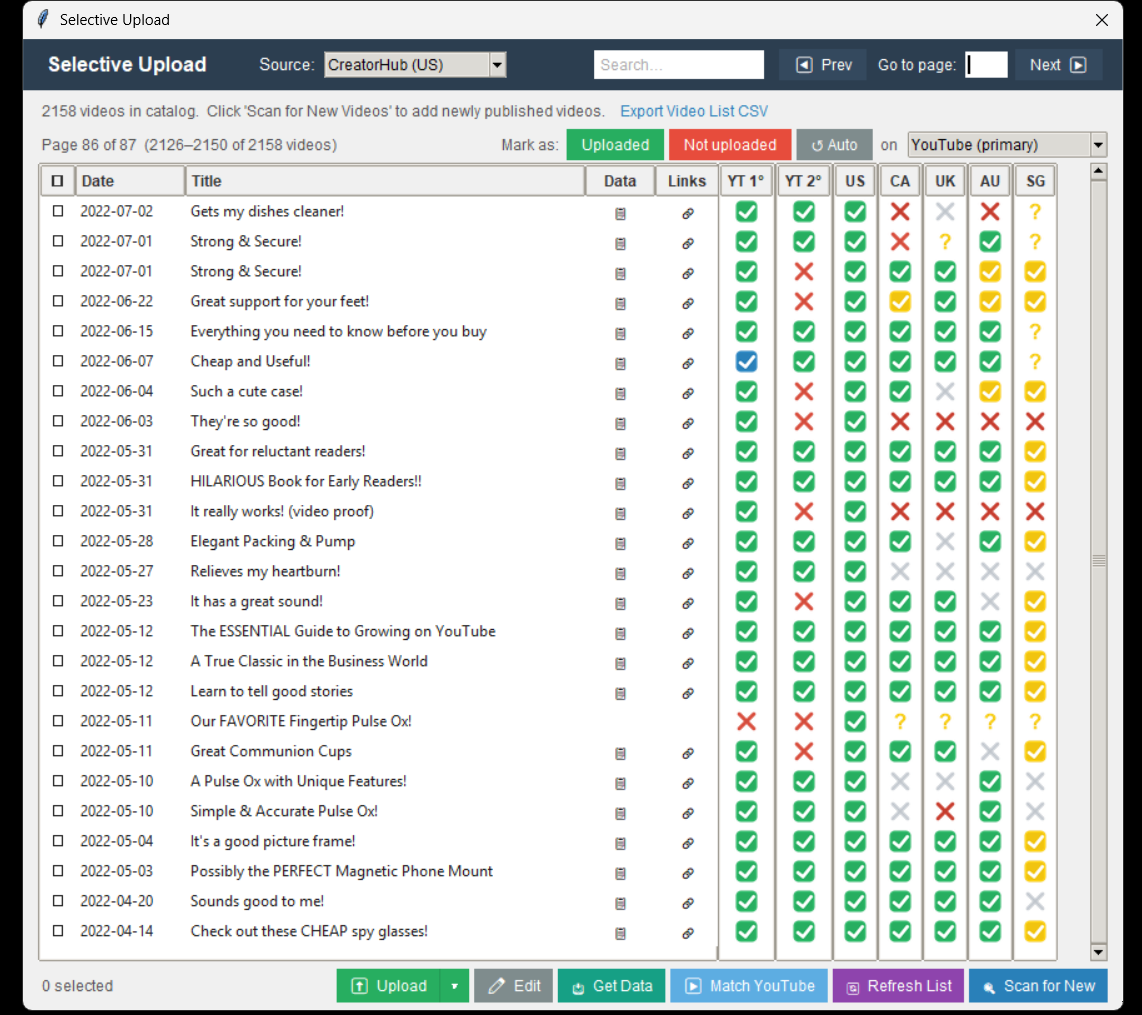
Selective Upload & Upload Queue

See every video and where it's been posted in one grid, pick exactly which ones go where, or line them up in the Upload Queue — even import a list of ASINs from CSV or Excel.

⏰

Scheduling

Run automatically up to 12 times a day, space YouTube uploads 15 minutes to 12 hours apart, schedule your social posts, or pick videos to upload at a date and time you choose.

📊

Run Summary NEW

After every run, see what was posted where — with links — what was skipped and why, and anything that needs your attention.

👥

Built for VAs

Hand the work to a VA: international uploads use VA-friendly links, and the US Creator Hub can be hidden for helpers who don't have access to it.

🖥️

Windows, Mac & Linux

Native desktop app for Windows, Mac (Apple Silicon & Intel), and ChromeOS / Linux.

🔄

Continuous Updates

Your subscription includes all future updates and new features at no extra cost — forever.


💰 Earn 20% Recurring Commissions

Love Cha-Ching Automate? Share it and earn 20% of every subscription — month after month.

Join the Affiliate Program →
FAQ

Frequently Asked Questions

What is Cha-Ching Automate?
Cha-Ching Automate is desktop software that takes the videos you've made as an Amazon Influencer and posts them everywhere else automatically, in bulk — to YouTube (with titles, descriptions, thumbnails, playlists, and affiliate links), to up to 18 international Amazon storefronts (captioned in the local language for non-English markets), to TikTok, Instagram, Facebook, Pinterest, and Threads, and to Walmart — so a single video earns commissions in many places at once.
Do I still need this with Amazon's Global Storefront?
Yes, if you want your videos anywhere beyond the storefronts you merged. Global Storefront shares your videos across those Amazon storefronts, and Cha-Ching Automate leaves them alone so nothing posts twice. It still posts to YouTube, TikTok, Instagram, Facebook, Pinterest, Threads, Walmart, and any Amazon storefronts outside your merge, and it handles Creator Connections. Haven't merged? It posts to your storefronts for you, captioned in each local language.
Who is this software for?
It's designed for Amazon Influencers who have a backlog of videos and want to earn additional income from them — on YouTube, international Amazon storefronts, social media, and Walmart — without manually downloading, translating, and re-uploading each video platform by platform. It's also easy to hand off to a VA.
Which international Amazon storefronts does it post to?
Up to 18: Canada (CA), the United Kingdom (UK), Australia (AU), Singapore (SG), India (IN), Germany (DE), France (FR), Italy (IT), Japan (JP), Spain (ES), Poland (PL), Belgium (BE), and the Netherlands (NL) — plus Sweden (SE), the United Arab Emirates (AE), Saudi Arabia (SA), Brazil (BR), and Mexico (MX), which you'll need to turn on in Settings → Advanced first. Each post is tagged with that storefront's own product, and for non-English markets each video's audio is automatically transcribed, translated, and captioned in the local language before it's posted. New storefronts ship as a software update at no extra cost.
Which social media sites can it post to?
TikTok, Instagram, Facebook (your Page), Pinterest, and Threads. Posts can go out right away or on a schedule, and Facebook, Pinterest, TikTok, and Threads can save them as drafts so you can tweak them first. Rules for each site decide which videos go there, and your Amazon thumbnail becomes the cover image.
Can it post to Walmart?
Yes, if you're a Walmart Creator. Each video becomes a shoppable Walmart post tagged with the Walmart product whose picture matches your Amazon product; videos with no match get a "Find it on Walmart" link in the Run Summary so you can pick the product yourself. It can also share each new Walmart post to YouTube Posts or your Facebook Page.
Can it post photos too?
Yes. Photos can be posted to YouTube (as a Post), every social site, Walmart, and your other Amazon storefronts. For each destination you choose videos, photos, or both — and you can post each video's thumbnail as its own photo.
Does it work with Creator Connections?
Yes. It looks up Creator Connections campaigns for the products in your videos — including older videos — accepts the best campaign, and submits your video links to it. It can also message each brand with the links you submitted, using a template you write, and it never sends the same link twice.
Can it add an AI voiceover in each language?
Yes. Beyond translated captions, Cha-Ching Automate can generate a natural AI voiceover that dubs each video into the target language of your non-English Amazon uploads — so viewers hear the content in their own language, not just read it. The voiceover is powered by OpenAI and costs roughly 1¢ per minute of video.Runs through OpenAI, which requires you to maintain billing with OpenAI.
Do I need an OpenAI account?
Only for the optional AI features: Paid captions, the AI voiceover, AI-written titles, descriptions, and social post text, thumbnail text translation, and AI-written Walmart shares. These run through OpenAI, which requires you to maintain billing with OpenAI — you pay OpenAI directly for what you use. Everything else, including the free caption engine, works without it.
How is this different from other tools?
Other tools require you to manually download videos from Amazon, upload them to YouTube, and link your YouTube video to your Amazon listing. Cha-Ching Automate runs in bulk, works hands-off in the background, and posts to YouTube, international Amazon storefronts, five social sites, and Walmart from one app — dramatically reducing your time per video.
Is the setup complicated?
Initial setup takes about 10–20 minutes. The software walks you step-by-step through connecting your YouTube API, and logging into YouTube, Amazon, and a deep-link service. Storefronts, social sites, and Walmart are added by signing in to each one in Connected Accounts. After setup, you simply click "Run Now" — or let it run on a schedule.
Can I control which videos get uploaded?
Yes. You can filter by upload date range or by page number in your Creator Hub, use Selective Upload to pick the exact videos (and destinations) you want, line videos up in the Upload Queue — including importing a list of ASINs from CSV or Excel — and set rules for each destination. This makes it easy to process backlogs or just upload yesterday's videos.
Can I customize titles and descriptions?
Yes. You can use variables like Amazon title, brand name, and category — or have AI rewrite your titles and descriptions with a prompt you control.AI rewriting runs through OpenAI, which requires you to maintain billing with OpenAI.
Does it schedule posts?
Yes. YouTube videos can be scheduled 15 minutes to 12 hours apart, social posts can be scheduled on every site, you can pick videos to upload at a date and time you choose, and the app can run on its own up to 12 times a day.
Does it detect duplicate uploads?
Yes. Your Amazon storefronts can be synced so it recognizes videos already posted there and skips duplicates, and the Match YouTube feature checks your existing YouTube uploads to avoid re-posting videos you already have there. Match Amazon does the same for videos you've already posted to your international storefronts. Going forward, it also tracks every video it has uploaded.
Can my VA run it?
Yes. International uploads use VA-friendly links, and the US Creator Hub can be hidden for helpers who don't have access to it.
How much does it cost?
Cha-Ching Automate is $20/month or $200/year (save 17%). Prices increase to $20/month and $200/year on June 1, 2026.The optional AI features run through OpenAI, which requires you to maintain billing with OpenAI — you pay OpenAI directly for what you use.
Is there an affiliate program?
Yes (sign up here). Affiliates earn 20% recurring commission, and their referrals receive 10% off when they use your coupon code.
Which computers does it run on?
Windows, Mac (Apple Silicon and Intel), ChromeOS, and Linux.